
A short link is a tidy address such as ac-co.ai/s/vat-oct that you can text, print, put in an email or turn into a QR code. It counts its clicks. Add UTM tags and it also tells you which post, email or flyer brought people in.
Everything below happens on the Short links page in the CRM (left-hand menu). You never have to type a UTM tag by hand: the form adds them for you.
1. Make a short link
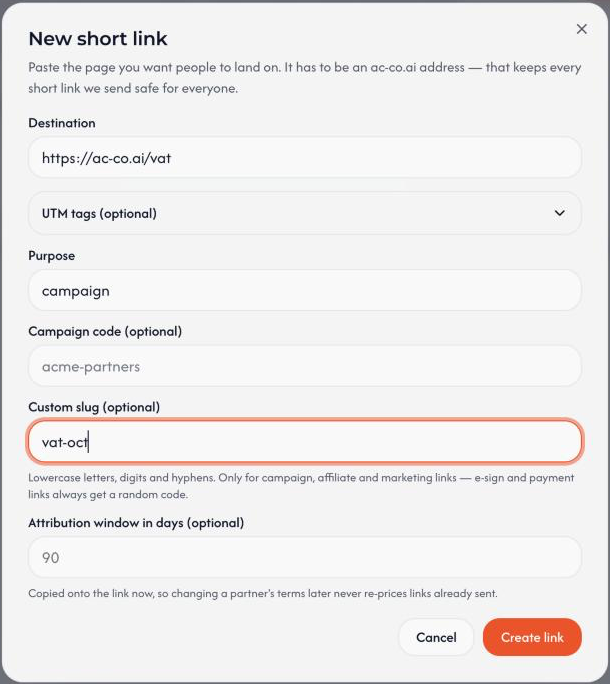
- Open Short links and press New link (top right).
- Paste the page you want people to open into Destination. It must be an ac-co.ai page, so it starts with
https://ac-co.ai/. - Leave Purpose as
campaignfor anything you share publicly. - Optional: type a Custom slug such as
vat-guideto getac-co.ai/s/vat-guideinstead of random letters. Use lowercase letters, numbers and hyphens. - Press Create link. The short link is copied for you, so paste it wherever you need it.
2. Make a short link with UTM tags
UTM tags are little labels added to the end of an address. They tell our analytics where a visitor came from.
- Press New link and paste the destination.
- Open UTM tags (optional).
- Press a preset: LinkedIn, Facebook, Newsletter or Google Ads. It fills in Source and Medium for you.
- Type a Campaign name, for example
vat-guide-oct. - Check Final destination. That is exactly where the short link will send people, tags included.
- Press Create link.
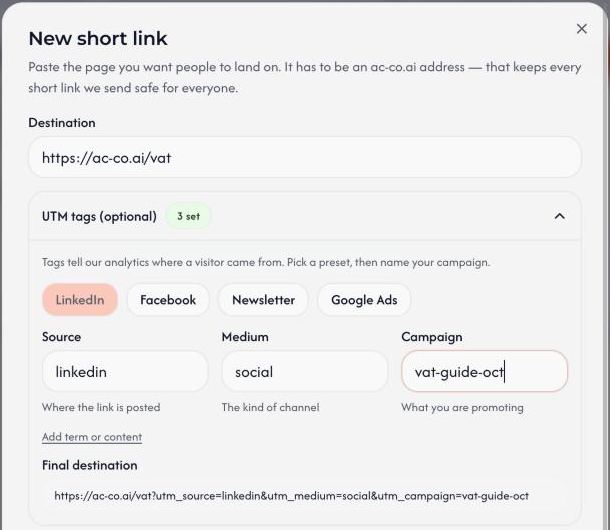
If the address you pasted already has a tag, such as utm_source, the form shows a note. A tag you fill in replaces the same tag in the pasted address. A field you leave blank changes nothing.
3. Plan your tags, then shorten and share
Decide the tags first, then make the link. Five minutes of planning keeps your reports readable.
What goes where
| Field | Question it answers | Examples |
|---|---|---|
| Source | Where does the link live? | linkedin, facebook, newsletter, google, a partner's name |
| Medium | What kind of channel is it? | social, email, cpc (paid ads), referral, qr |
| Campaign | What are we promoting? | vat-guide-oct, spring-launch |
| Content (optional) | Which of two links in the same place? | blue-button, banner |
| Term (optional) | Which paid keyword? | vat-software |
Naming rules
- Lowercase, with hyphens instead of spaces.
- Always the same spelling. Reports treat
linkedin,LinkedInandlinked-inas three different sources. - Never put names, emails or phone numbers in a tag.
- One link for each place. If a post and an email share one link, you cannot tell them apart.
- Name campaigns by topic and month, such as
vat-guide-oct.
Example
A LinkedIn post about the VAT guide.
- Destination:
https://ac-co.ai/vat - Preset: LinkedIn (source
linkedin, mediumsocial) - Campaign:
vat-guide-oct - Custom slug:
vat-oct
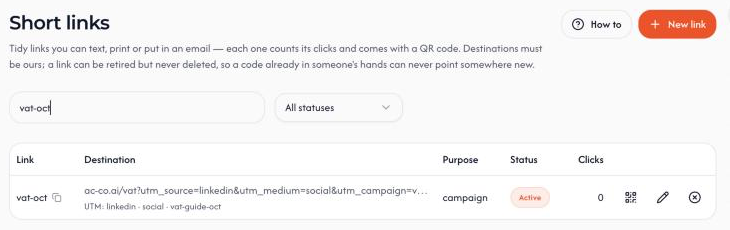
People who open ac-co.ai/s/vat-oct land on:
https://ac-co.ai/vat?utm_source=linkedin&utm_medium=social&utm_campaign=vat-guide-oct
Then share it
- Click the code in the list to copy the link again.
- Click the QR icon to show a QR code you can print or download.
- Already printed a link without tags? Add
?utm_source=flyerto the end of the short link and we pass it on. Onlyutm_tags are passed on, and only when the destination does not already have that tag.
Where the tags show up
- Google Analytics reads the tags when someone lands on the page. Visitors who have not accepted cookies are counted anonymously.
- The CRM visitor log stores the tags with each visit, but only for visitors who accepted analytics.
- The short link itself always counts every click, whatever the visitor chose.